New timeline design has removed events on the timeline.
New timeline design has removed events on the timeline.
The new timeline design seems to have deleted a lot of the events that I have in the timeline itself. While scrolling through the timeline it seems to have deleted everything labeled as major events or milestone events but it also seemingly at random deleted a good amount of other events as well. I have no idea why this has happened as when I checked yesterday it was perfectly fine. This is of course extremely bad as the timeline exist to document dates and such for major events and without it working properly everything sort of falls apart.
Steps to Reproduce
I just opened the timeline and the majority of the events previous on the timeline were missing. All I did was open the timeline nothing else.
Operating System
WindowsBrowser
Google ChromeRelated Entity
https://www.worldanvil.com/p/timeline/edit/c344918e-40a3-40ef-9f70-d4a26ef9eded
This is the link to the main timeline effected by this though all of my timelines have been effected by this bug
History
I actually just switched the timeline over to the legacy version and all the events that disappeared are seen in the legacy version so it is definitely an issue with the new style of the timelines
This just happened to me as well! It's a timeiine I'm using to plot a series with a ton of events that I've spent hours on. Losing it is going to really set me back. I really hope there's a restoration point! Also, guess I need to backup somewhere else and not rely on this site.
Swapping worked for me as well (thankfully). I like the look of the new timeline a lot better, it's easier for me to see since I have a lot and I can zoom out better, but I'm happy it's all there, and I'm still doing a backup.
Hi everyone! It's just a rendering issue, some edge cases missed us (limited sample size for testing) - thanks for attaching the link, you have a lot of content so it will be much easier to debug this way -> hopefully today I can fix it :)
Also, there's no probable chance of content loss because all of the delete functionalities are user driven, we dont touch your data in any system unless you choose to delete an event :)
Tomorrow there'll be release which fixes it, I'll let everyone know when its online
How do we switch to the legacy version?
You can do it in the sidebar timelines section, 3 dots and then convert to legacy but the patch will be up in a couple of hours :)
Should be fixed :)
Would this also affect eras? I have a starting era on this timeline that I can now only access in Edit mode using the Up button. I can't see it on the timeline, nor can I access it at all in View mode. This timeline was submitted to WAWA, so I can't make edits to troubleshoot or try to force it to appear. I thought it might be the same bug as this, but if it's different I can open a new report so this one can be closed.
I am experiencing the same issue as Those2Nerds with regard to my starting era. I am also experiencing an issue where my current era always says "Current era can't wrap around any other era" no matter what starting date I enter. I do not have any eras set to be after the current era, and I had this current era set up before the update and did not experience this issue.
I made a post on the subreddit about this, but I just wanted to drop it here in case anyone else was experiencing the same issue.
Still have events not showing up on my timeline. They still exist, and I can find them through their links to characters or locations, they just aren't appearing on the actual timeline.
chipey, can you send me a link to the timeline you are experiencing this in?
Those2Nerds, are you referring to the Age Of First Expansion?
I'm referring to Pre-Stellar Age, which is a starting era. It was visible and selectable before the recent update, now I can't see it at all. I can sometimes manage to select it in edit mode, but not consistently.
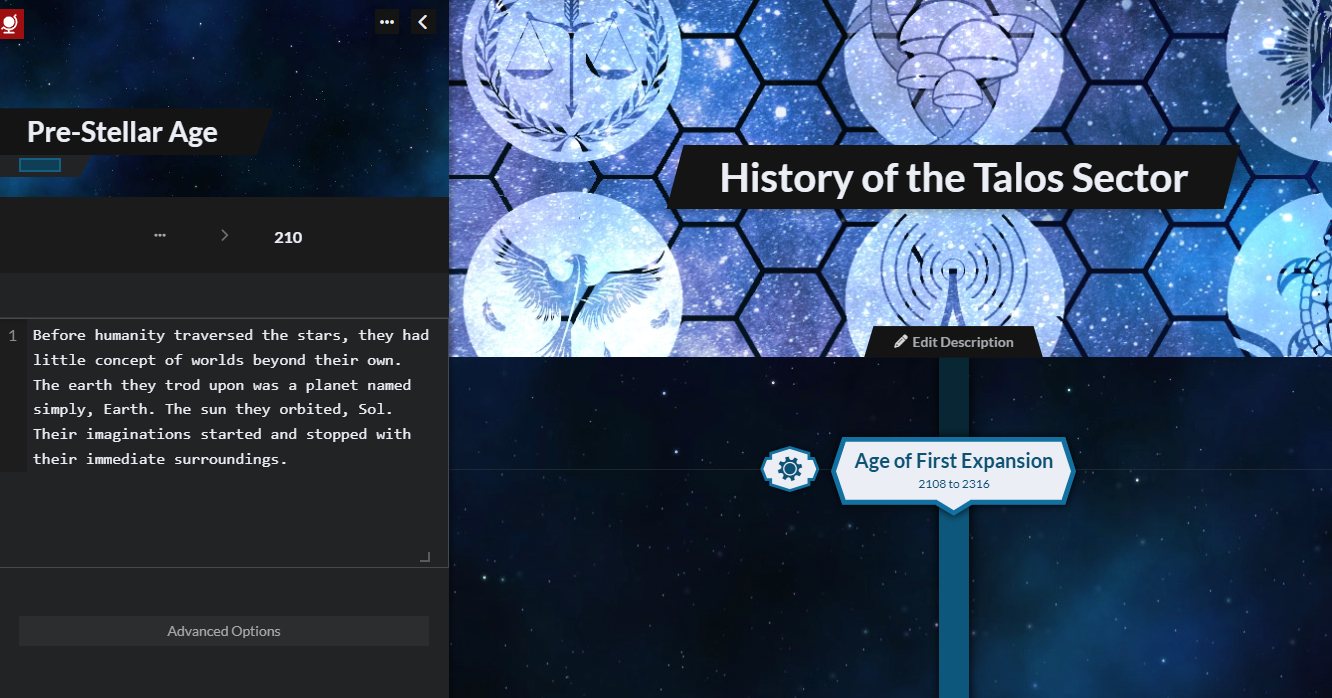
okay, that is new, ill take a look at it
for now you can just move the age of first expansion by 1 year forward because the eras overlap together and I need more internal information on how to handle this case :)
I will give it a try after WAWA when I can edit this timeline again.
chipey2000 you can check your timelines and let me know if your issue got fixed
Sorry for the lack of response, hopefully this link works. Just some notetaking I've been doing on the Elder Scrolls universe fyi.
https://www.worldanvil.com/w/aurbis-chipey2000/t2/global-timeline-timeline
It's a pretty large timescale but a good place to look would be at the beginning of the third era (orange segment on the navigation bar), there should be a timeline event spanning from 3817 to 3855, if you scroll down you can see where his reign ends and Kintyra the First's begins. If you scroll further there should be an unbroken chain of Septim rulers leading to the end of the third era with Martin Septim, but there are several others missing. There may be a few other events missing, but the Septim rulers are the most obvious.
The link works but on further inspection I can see that you timeline has 0 public events and thats why they are not showing inside of the public view. You can change that in the header of the event sidebar
Now that WAWA is over, I can do more testing regarding the invisible starting era. Changing dates so the starting era's end date is before the next era's start date does get it to reappear. However, this causes other aesthetic/visual issues with backgrounds and the right-side ribbon not looking right, especially in comparison to all other era transitions. Adding an event a couple years before the first era (so it occurs in the starting era) also resolves the issue, as the starting era moves itself to the same line as that event. With some fiddly CSS, I can set that event's opacity to 0 so it's not visible but the starting era is.
Find your way!
Resources
WHO WE ARE
LEGAL
Listen to our Podcast



