Timeline interaction failure. (Interacting with my timeline produces an error that blocks editing the timeline)
Timeline interaction failure. (Interacting with my timeline produces an error that blocks editing the timeline)
When I open my timeline via the sidebar, I am taken to the classic timeline screen showing my work.
I can still scroll and read the timeline, but as soon as I click on anything - an entry, era, title - the timeline crashes and produces an error screen.
This has been happening for at least a few weeks. I have been on different machines - laptop, computer - in various locations with different Ethernet connections and Wi-Fi connections.
On the error screen was the phrase: "7e3f6c77f71845fa8add83dfb92e8c68" shown to me to send here in order to help with the investigation...
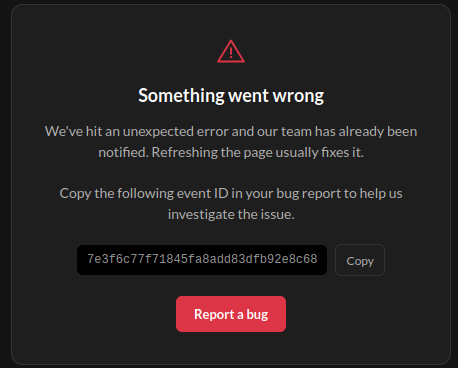
Picture of the main error. Aside from that, the screen is plain black (see the very edges of the image and image that across the entire screen)
I have refreshed the page and still get the error.
Steps to Reproduce
Below are the steps on how I have found the bug during editing the timeline.
Open sidebar.
Select timeline.
Open a timeline from the menu.
See the timeline with historical entries.
Click on an entry or try to edit anything in the timeline.
Click on "edit description" below the title.
Doing anything (for me) produced the above crash.
Operating System
LinuxBrowser
FirefoxRelated Entity
https://www.worldanvil.com/w/the-pindisc-galaxy-eldrin-of-avaloth/t2/the-arcathian-timeline-timeline
Related to my timeline, and editing the timeline.
History
Hi! I cannot reproduce what you are reporting in any way. And since nothing similar is being reported by anyone else it is most likely that this is an issue local to your machine.
As a first step try accessing your timeline from a different browser. Also try incognito mode, maybe you have some extension that is interfering. You could also try with a different device if one is available, perhaps one with a different OS. Try these out and let me know if anything worked so I can narrow down what is happening.
I understand. Thanks for looking and trying at the very least.
I wonder what the issue is, and I will try to find out.
Thank you
I will keep an eye out for anything that might help you. Try out my suggestions and see if anything changes. That would make investigating this a lot easier. I also suggest making a new timeline to see if the problem persists there.
If you are still getting these crashes please send me a fresh event ID. It might help pin down your issue
Find your way!
Resources
WHO WE ARE
LEGAL
Listen to our Podcast



